
Why "Model-in-Place" Is Ruining Your As-Built Performance
Written by: P. Hooley | Published: 11th June 2026
When modelling an as-built from site data (like point clouds), it’s tempting to use Model-in-Place for a quick geometry fix. It’s fast, but for a professional-grade model, it’s a trap.
Here is why you should switch to Loadable Families (.rfa):
File Weight & Performance:
As-built models are already heavy. Copy a Model-in-Place element 50 times, and Revit processes 50 unique geometric definitions, bloating your file.
A Loadable Family loads once, keeping the file lightweight and responsive no matter how many times it's placed.
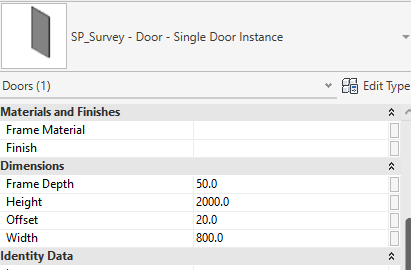
Effortless Global Edits:
If site data updates or a secondary survey check requires a dimension tweak, a Model-in-Place element must be edited or replaced manually at every single instance.
With a Loadable Family, you edit it once, reload it, and every instance updates instantly while holding its exact coordinates.
Clean Data & Scheduling:
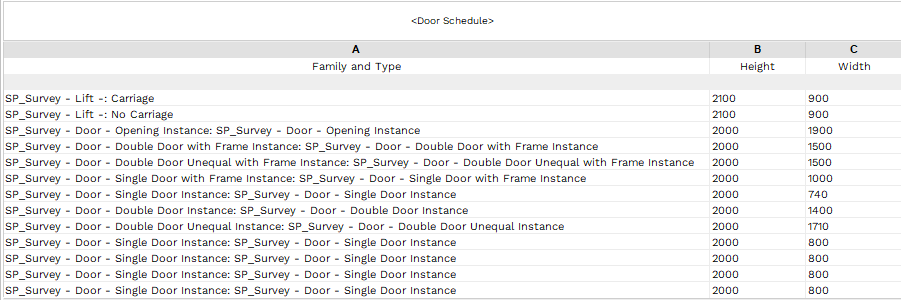
An as-built is a database of asset conditions. Model-in-Place geometry is notoriously difficult to schedule cleanly.
Loadable families support Shared Parameters, ensuring your handover schedules are uniform and accurate.
Parametric Flexibility:
Existing structures have real-world variations.
Parametric loadable families let you use instance parameters to tweak dimensions to match on-site deviations without redrawing the geometry from scratch.
The Golden Rule:
Reserve Model-in-Place strictly for unique, non-repetitive site anomalies (like a warped historical vault).
For standard columns, structural details, windows, or fixtures, use loadable families. Your model health will thank you.
Request a proposal
Tell us about your survey and we’ll help you take the next step.






Trusted Suppliers for:
















Request a proposal
Use the full proposal form to add survey details and upload plans. Privacy policy